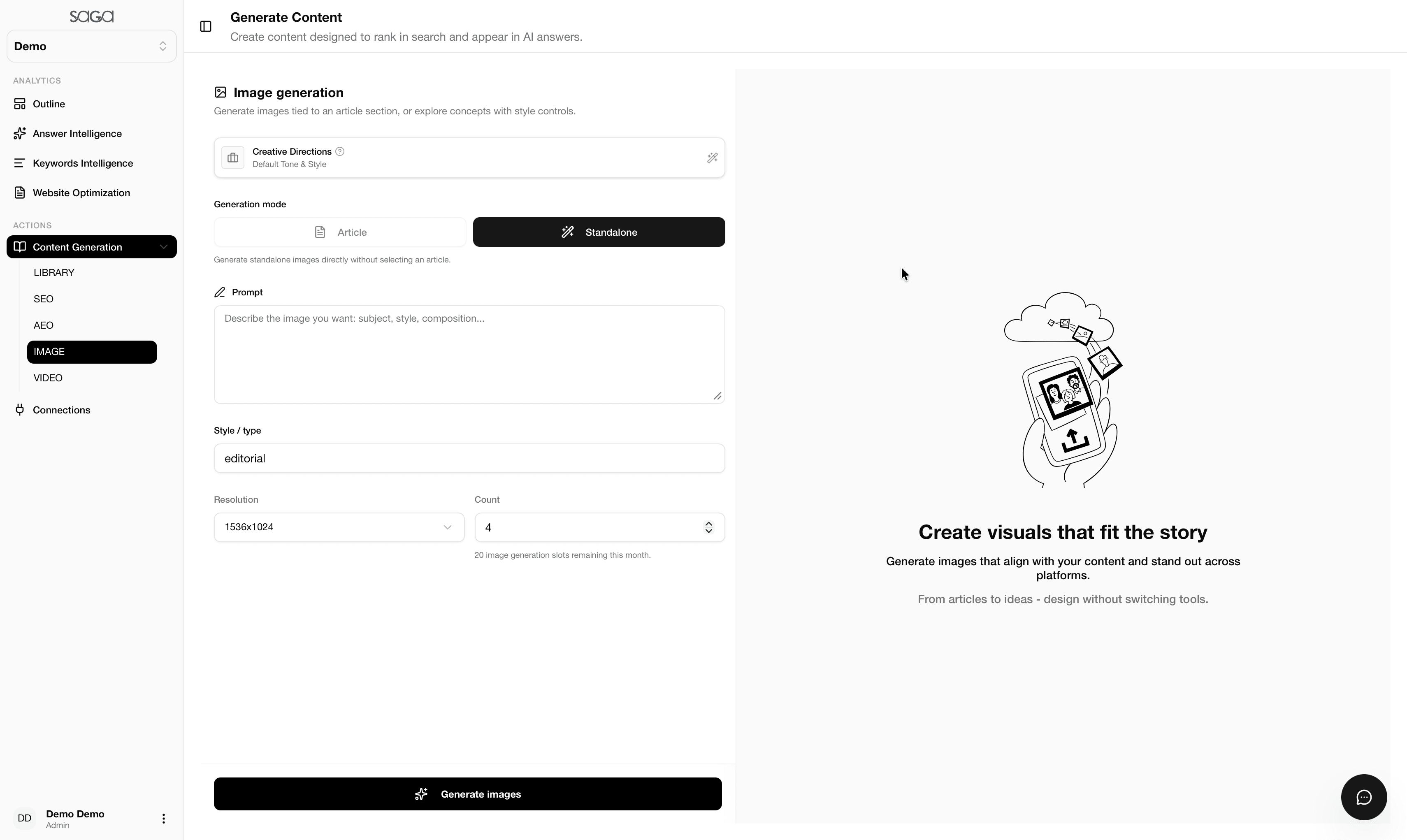
Creative Directions
Set the visual intent before generation so the image feels connected to the content strategy. Good creative direction reduces cleanup and makes outputs more publishable.
a creative studio for generating branded visuals with configurable style, resolution, and count
AI Image Generation is a creative studio for generating branded visuals with configurable style, resolution, and count. In practical terms, it gives your team a clear way to understand the signals that matter most for modern discovery, whether that discovery happens in search, in an AI assistant, or in a blended answer experience. Instead of guessing how visibility is changing, you get a structured view of where the opportunity sits, what is already working, and what still needs stronger evidence or cleaner execution. That is what makes the feature useful not just for reporting, but for active decision-making across marketing and product teams.
Inside SAGA, ai image generation is designed to turn raw platform output into an editorial or operational decision. That means the feature does more than show you a score or a list. It helps you decide what to fix, what to expand, and what to track next so the work feels connected to business outcomes rather than isolated reports. The result is a repeatable way to move from observation to action without losing the strategic context behind the data.
AI Image Generation matters because buyers now move between search engines, AI assistants, and answer-first interfaces without thinking about the boundaries between them. If your brand is invisible or weak in one of those environments, the gap can affect awareness, trust, and demand even when classic SEO metrics still look acceptable. That makes the feature relevant for both growth teams and leadership teams that need to understand why market visibility changes even when traditional analytics appear stable.
For teams working in content studio, the difference between a useful program and a noisy one is usually clarity. A strong ai image generation workflow helps you see where you are winning, where competitors are pulling ahead, and which pages or prompts deserve immediate attention. It also creates a shared language between content, SEO, and operations so improvements can be prioritized without long back-and-forth meetings.
Visual production can slow content launches when teams need custom assets but do not have time to source or design them all manually.
It is hard to keep image style consistent across multiple articles and campaigns without a structured workflow.
Teams may need several variants for testing but lack the time to produce them efficiently.
AI Image Generation in SAGA solves the analysis problem by pulling the relevant signals into one repeatable workflow. That keeps the team from toggling between exports, screenshots, spreadsheets, and point tools just to answer a simple question about performance. The platform turns the output into a shared source of truth that content, SEO, and leadership can understand together, which lowers the friction of turning findings into actual tasks. It also helps new teammates ramp faster because the logic of the review is visible in one place.
The other advantage is prioritization. Instead of asking the team to improve everything at once, SAGA helps you focus on the pages, prompts, sources, or assets that are most likely to move the result. That creates a more realistic operating model, because small teams can still make strong progress when the next step is obvious. In practice, that means the platform can support both quick wins and deeper strategic work without forcing you to choose between them.
SAGA turns visual creation into a guided workflow so teams can produce on-brand imagery faster.
The generation controls make it easier to create images that match the content's message and format.
Because the output lives inside the platform, it can support content operations instead of sitting as a disconnected tool.
Each sub-feature below is explained in practical terms so the page can be used as both a product explainer and an SEO landing page.
Set the visual intent before generation so the image feels connected to the content strategy. Good creative direction reduces cleanup and makes outputs more publishable.
Choose the type of creation flow that best matches the task, whether you need a concept, a variant, or a more polished result. Mode selection keeps the tool aligned with the work at hand.
Describe the image in enough detail to guide the model toward the right composition and feel. Strong prompts improve consistency and reduce the need for repeated retries.
Control the look and format so the output matches the brand and the channel. Style choices are important because the same concept can feel very different depending on presentation.
Adjust image quality to match publishing needs. Resolution control helps teams balance speed, clarity, and the final usage context.
Generate more than one option when you need alternatives for testing or review. A small set of variants can accelerate decision-making significantly.
A content team needs a cover image for a new article.
A marketer wants several visual concepts for one campaign.
A founder wants faster branded creative for content publishing.
A team needs visual variants for testing or iteration.
Every feature page includes a table so teams can compare SAGA against manual workflows or disconnected tools.
| Dimension | SAGA | Manual / Point Tool |
|---|---|---|
| Coverage | SAGA gives a unified view of ai image generation across the signals that matter most. | Manual reviews or isolated point tools usually capture only a slice of the full picture. |
| Priority | Findings are organized so the next action is easier to choose and defend. | Generic reports often show issues without making it clear which ones matter first. |
| Collaboration | SEO, content, product, and leadership can work from the same dashboard and language. | Disconnected tools make it harder for teams to agree on the next move. |
| Momentum | You can repeat the workflow as pages and prompts change over time. | One-off analysis slows momentum and makes it harder to measure progress. |
Choose a keyword cluster, target topic, or creative prompt to guide your content generation workflow.
SAGA's AI-assisted studio drafts article outlines, generates high-quality text, or creates supporting images and videos.
Review the generated drafts, check for prompt alignment, and verify that readability and structure match target platforms.
Publish the finalized assets directly, save them to your Content Library, and reuse successful elements for future projects.
Eight FAQs are included on every feature page so the page can answer common purchase, usage, and workflow questions directly.
Get started with SAGA's comprehensive visibility audit and platform-by-platform optimization checklist.